Tuesday, August 29, 2006
Vienna again
It has been along time since I updated this blog. It seems that I have so many things to do, there is hardly any time left. Of course, it is always a matter of priorities, so you can figure how high this blog is on my list. Anyway, I was in Vienna in July, two times during the same month. Very hot weather. Vienna is a great city. For chocolates I recommend ‘Xokolat’, at Freyung 2 (Tel. 5354363). A large selection and not too expensive. I tried a 100% for the first time and I definitely do not recommend it; too bitter. I threw most of it away. However, the regular ones were excellent. The ‘Queen of Finland’ was kind enough to bring me some Fazer, which was very much appreciated. I guess we will see each other again in Berlin.


Thursday, February 16, 2006
Minus 25 degrees
Got back from Helsinki, after 4 days in the cold. I had a wonderful time and I have to thank the Queen of Finland once again (Jutti knows who I mean). I flew from Athens to Helsinki through Munich and I have to remember to avoid doing this in the future, because it seems that Munich has a tendency to get fogged-out in the winter, which leads to delays and cancellations. Fortunately I was lucky and had only half an hour of delay, which did not affect my arrival. Helsinki seemed out of this world. Everything frozen, snowing, landscape in black and white. I felt I had landed on another planet (e.g. Pluto). The next days were sunny, which, contrary to expectations (at least of those who live in milder climates) leads to lower temperatures (see title above). Some observations regarding these temperatures: snow does not melt, it just remains dust and gets blown by the wind like sand; also, do not touch metal doors or gates with bare hands (your hands will freeze and may get stuck on the cold metal). When I flew back and landed in Munich (transit), the minus 12 degrees there felt nice and warm.
Finland has the Fazer chocolates. I bought those with the chilli peppers and they were rather good, not too strong.
Finland has the Fazer chocolates. I bought those with the chilli peppers and they were rather good, not too strong.
Thursday, September 29, 2005
My new Prius
I bought a Toyota Prius just a week ago. I have been procrastinating over it for a long time, but finally reminded myself that we only live once. My primary reason was environmental, but I suspect that, in the end, other reasons will prove equally important (especially torque). First of all, I must say that fuel consumption is around 5 lt/100km, but I am keeping a log and will have more reliable data on this during the next months. My previous car, a Citroen Xanthia 1800, needed around 9.5 lt/100km, and that was by driving very smoothly and shifting into neutral when going downhill. My wife’s Peugeot 406 (2 lt) goes at 10 lt/100km. Apart from fuel consumption, other nice things are:
The Prius has an automatic transmission, which works very well and handles all the ‘high-tech’ business of engaging the electric or conventional engine and charging the battery (this is shown on the LCD display and is great fun in the beginning). After a while, this high-tech feeling may fade away and I think that I will not take much notice. However, when looking at the other cars on the road, you are reminded that you are driving something different.
Torque is great! I can climb steep roads going as slowly as I wish with no fear of the engine stalling. If the battery is well charged, this can even work with the electric engine only, so there is no noise (‘vroom-vroom’) and no exhaust fumes (very nice, if you are in a garage). There is a rather steep road very close to my office, with traffic lights. When the green light turns on, most cars have trouble starting without rolling back a bit. The Prius is so easy.
The car is silent (completely silent) when going on battery power. This is great in my garage, but if you are driving on the street, pedestrians may not realize you are there, so take care.
Interior room is very comfortable. The trunk is a bit small.
Acceleration is also very good (by family car standards), but, when the conventional engine kicks in, there is some engine noise. This is probably more noticeable in the Prius than other cars, because most of the times it is not there.
Main negative: Price was rather high, at Euro 28.500. When I bought the car, I was certain that fuel economy would not compensate for this, because I was comparing the Prius with cars that cost around 15.000 to 20.000 Euro. But now I think that this is more of a car than I thought, so perhaps a more valid comparison would be with a larger car, say an Avensis (at around 25000 Euro).
The Prius has an automatic transmission, which works very well and handles all the ‘high-tech’ business of engaging the electric or conventional engine and charging the battery (this is shown on the LCD display and is great fun in the beginning). After a while, this high-tech feeling may fade away and I think that I will not take much notice. However, when looking at the other cars on the road, you are reminded that you are driving something different.
Torque is great! I can climb steep roads going as slowly as I wish with no fear of the engine stalling. If the battery is well charged, this can even work with the electric engine only, so there is no noise (‘vroom-vroom’) and no exhaust fumes (very nice, if you are in a garage). There is a rather steep road very close to my office, with traffic lights. When the green light turns on, most cars have trouble starting without rolling back a bit. The Prius is so easy.
The car is silent (completely silent) when going on battery power. This is great in my garage, but if you are driving on the street, pedestrians may not realize you are there, so take care.
Interior room is very comfortable. The trunk is a bit small.
Acceleration is also very good (by family car standards), but, when the conventional engine kicks in, there is some engine noise. This is probably more noticeable in the Prius than other cars, because most of the times it is not there.
Main negative: Price was rather high, at Euro 28.500. When I bought the car, I was certain that fuel economy would not compensate for this, because I was comparing the Prius with cars that cost around 15.000 to 20.000 Euro. But now I think that this is more of a car than I thought, so perhaps a more valid comparison would be with a larger car, say an Avensis (at around 25000 Euro).
Tuesday, August 30, 2005
3D Rendering with Iso-surfaces
I am back on iso-surface rendering. After reading a lot of stuff on the subject I decided to experiment using points to render the surfaces. This is very easy to implement: you go through the whole volume, detect where an iso-surface lies (take a ‘cube’ composed of 8 voxels and see if all of them have values higher or lower than the iso-surface value; if they do, there is no iso-surface there, otherwise mark the center of the cube as an iso-surface point), and draw an OpenGL point for every detected position. Points can be drawn using glDrawArrays for very fast results. You also need to enlarge the size of the points, so that they do not leave holes between them, otherwise the ‘surface’ looks like a point cloud. Do that with glPointSize. Round points can be drawn with glEnable(GL_POINT_SMOOTH).
The results were not very nice. The image looked very ‘blocky’, as you can see here (click on image to enlarge).
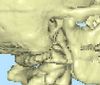
To improve this I thought I had to resort to constructing a true surface (of triangles). The best-known algorithm for doing that is the ‘marching cubes’, but it is patented (!). I found some alternatives, but I was concerned of the speed factor, besides the fact that they all seemed rather complicated to implement. Then I read ‘Interactive Ray Tracing for Isosurface Rendering’ and ‘Iso-splatting: A Point-based Alternative to Isosurface Visualization’ (search Google and you will find the pdf files). From these papers I realized that the problem was not the points per se, or the supposedly reduced resolution of the data, but the position of the points. I was placing each point in the center of the ‘cube’ of eight voxels, but the iso-surface could be passing through the cube at any position. In this way, the points were all aligned to each other, producing the ‘blocky’ effect. The solution was to move the points towards the iso-surface. The papers, mentioned above, describe some sophisticated ways to do that (using Newton-Raphson or solving a cubic equation), but, not being mathematically so proficient, I thought of a simpler method: I start from the center of the cube and iteratively move towards the iso-surface as follows: I use the gradient vector inside the cube to specify the direction I will move along. The gradient points from lower to higher values. Therefore, I start from the center of the cube and calculate the value there. If it is smaller than the iso-surface value (i.e. I am inside the surface), I move along the gradient by an amount equal to 1/4 the side of the cube, otherwise I move in the opposite direction. Then I calculate the value at the new position and repeat the process, but each time I halve the distance that I move. 3 or 4 such steps are enough to give the result shown in the second image. The solution is approximate but the result is great and the extra code incurs a very small time penalty.

Notice that, no matter how many times you iterate, you will never end up outside the ‘cube’. Conversely, if the iso-surface is very close to one of the corners, you will never reach it, but that does not seem to affect the result much.
The results were not very nice. The image looked very ‘blocky’, as you can see here (click on image to enlarge).
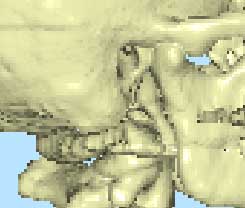
To improve this I thought I had to resort to constructing a true surface (of triangles). The best-known algorithm for doing that is the ‘marching cubes’, but it is patented (!). I found some alternatives, but I was concerned of the speed factor, besides the fact that they all seemed rather complicated to implement. Then I read ‘Interactive Ray Tracing for Isosurface Rendering’ and ‘Iso-splatting: A Point-based Alternative to Isosurface Visualization’ (search Google and you will find the pdf files). From these papers I realized that the problem was not the points per se, or the supposedly reduced resolution of the data, but the position of the points. I was placing each point in the center of the ‘cube’ of eight voxels, but the iso-surface could be passing through the cube at any position. In this way, the points were all aligned to each other, producing the ‘blocky’ effect. The solution was to move the points towards the iso-surface. The papers, mentioned above, describe some sophisticated ways to do that (using Newton-Raphson or solving a cubic equation), but, not being mathematically so proficient, I thought of a simpler method: I start from the center of the cube and iteratively move towards the iso-surface as follows: I use the gradient vector inside the cube to specify the direction I will move along. The gradient points from lower to higher values. Therefore, I start from the center of the cube and calculate the value there. If it is smaller than the iso-surface value (i.e. I am inside the surface), I move along the gradient by an amount equal to 1/4 the side of the cube, otherwise I move in the opposite direction. Then I calculate the value at the new position and repeat the process, but each time I halve the distance that I move. 3 or 4 such steps are enough to give the result shown in the second image. The solution is approximate but the result is great and the extra code incurs a very small time penalty.

Notice that, no matter how many times you iterate, you will never end up outside the ‘cube’. Conversely, if the iso-surface is very close to one of the corners, you will never reach it, but that does not seem to affect the result much.
Monday, August 29, 2005
Delphi 2005, Firefox and Hyper-threading
I got Delphi 2005. Installed it, tested it, liked it, went back to Delphi 7. Why? Because it seems to have annoying bugs. The first thing I noticed was the very long loading time. This is, of course, not a bug, but still, it is irritating. Presumably there are a lot of things to load, because Delphi 2005 comes with .NET support and a whole lot of other stuff. Anyway, I am willing to put up with this, but then I noticed that things were really moving very slowly. Response was lethargic and there was no explanation (my machine is a 3GHz with 1Gb of RAM). Then, there were problems with loading the TLB library of my project (by the way, the Delphi 7 project loaded with no compatibility problems, which is a huge plus). The library editor would not show the contents properly and Delphi kept asking to save the TLB file every time I exited, even if nothing had been changed.
The most serious problem was the very slow response of the program. I searched the Internet and finally found the answer: Delphi 2005 seems to be incompatible with hyperthreading. What is this, you may ask. Well, as far as I understand, the new motherboards have a special feature that makes Windows think that there are two processors available, when you only have one. This way, some programs are supposed to work faster. However, it seems that this may cause incompatibilities. There is a way to disable this from inside Windows, but it has to be done every time you start the specific program. I tried it with Delphi 2005 and after disabling the ‘dual processor’, things breezed along. I then remembered that I had the same problems with Firefox. Firefox just hung up for long intervals and I had to give it up and return to Internet Explorer. However, after disabling the ‘dual processor’, Firefox worked fine. So, in the end, I decided to disable this feature completely. This was easily done by using the BIOS setup. You need to go to Advanced CPU configuration and disable Hyper-Threading technology. After that, Windows sees only one processor and everything works great.
The end result? I am back on Firefox, but I am waiting till Borland issues an update on Delphi 2005 to start using it.
The most serious problem was the very slow response of the program. I searched the Internet and finally found the answer: Delphi 2005 seems to be incompatible with hyperthreading. What is this, you may ask. Well, as far as I understand, the new motherboards have a special feature that makes Windows think that there are two processors available, when you only have one. This way, some programs are supposed to work faster. However, it seems that this may cause incompatibilities. There is a way to disable this from inside Windows, but it has to be done every time you start the specific program. I tried it with Delphi 2005 and after disabling the ‘dual processor’, things breezed along. I then remembered that I had the same problems with Firefox. Firefox just hung up for long intervals and I had to give it up and return to Internet Explorer. However, after disabling the ‘dual processor’, Firefox worked fine. So, in the end, I decided to disable this feature completely. This was easily done by using the BIOS setup. You need to go to Advanced CPU configuration and disable Hyper-Threading technology. After that, Windows sees only one processor and everything works great.
The end result? I am back on Firefox, but I am waiting till Borland issues an update on Delphi 2005 to start using it.
Wednesday, June 22, 2005
More recipes (evidence-based) and DICOM
Finally, the British Medical Journal (BMJ) has released the results of the “polymeal” competition. You can find all recipes on bmj.com. From the winner recipe (submitted by Heather Haywood) I particularly liked the fondue. I am going to try the other ones as well (albeit with some minor modifications), and perhaps let you know the results.
During the past couple of months I have been doing many things, one of which was to try and implement DICOM network communication between my cephalometric software and a DICOM server. I must say that this is a very frustrating endeavour because the DICOM information manual (published by NEMA - National Electrical Manufacturers Association, medical.nema.org) is very difficult to read and understand. I got a lot of help from looking at the source code provided by the DCMTK software package and using the Conquest software as a testing bed. While I was doing all this, I was thinking about writing a do-it-yourself guide for all those who may need to do the same, but I am afraid that there is no free time. However, I am planning to release the source code, when it is done. Currently I am at the stage where the client communicates with the server and gets info about what images are available. The next step (which shouldn’t be that difficult) is to actually transfer the image from the server to the client.
During the past couple of months I have been doing many things, one of which was to try and implement DICOM network communication between my cephalometric software and a DICOM server. I must say that this is a very frustrating endeavour because the DICOM information manual (published by NEMA - National Electrical Manufacturers Association, medical.nema.org) is very difficult to read and understand. I got a lot of help from looking at the source code provided by the DCMTK software package and using the Conquest software as a testing bed. While I was doing all this, I was thinking about writing a do-it-yourself guide for all those who may need to do the same, but I am afraid that there is no free time. However, I am planning to release the source code, when it is done. Currently I am at the stage where the client communicates with the server and gets info about what images are available. The next step (which shouldn’t be that difficult) is to actually transfer the image from the server to the client.
Thursday, April 28, 2005
Baklava

Yesterday I made some baklava (for the first time). Now this should be considered heresy, because it contains no chocolate, but it came out excellent (even Katerina thought so), so I will give you the recipe. You need phylo for baklava (very thin), 250 gr pistachio nuts, 250 gr butter, 500 gr sugar and 300 gr water. I used a 30 x 35 cm baking pan. First melt the butter and use a brush to apply on the pan. Then add one phylo at a time. After spreading phylo sheet on the pan, brush liberally with butter. Continue for 8 to 9 layers. Then add the crumbled nuts, then add 8 to 9 more layers of phylo. Very important: carve the pieces (all the way down) with a sharp knife before baking. Cover with aluminium foil and bake for 30 minutes at 180 degrees (Celcius), then uncover and bake for 30 more minutes at 160, until golden. Meanwhile prepare the syrup by boiling the sugar and water for 5-10 minutes. When the baking is over, pour the syrup (while hot). I calculated total calories at around 6500, so that comes out at approximately 270 calories per piece (24 servings). I include picture of final product. Of course, you may also have seen chocolate baklava! This is something I should try some other day.
Monday, April 18, 2005
Back from Geneva and Vienna
Just returned from Geneva and Vienna. Weather was so-so, cloudy with a drizzle. In Geneva it was also rather cold. Why do the shops there close so early? Everything closes at 7 pm, and some shop owners close earlier than that, even though they have a sign with 7 pm on it at the door. I missed Zogg's the first day by about 10 minutes, but managed to be there on time the next day. I finally bought some chocolates from Zogg's (3 rue du Mont-Blanc) and from Gilles Desplanches (2 Confederation, Place Bel-Air). Prices are at around 95 Swiss francs per kilo, which is about 65 Euro. Both excellent, although I think that Gilles Desplanches may be slightly better. After returning home I tried to get into Zogg's web site (www.jpzogg.ch) but it does not seem to work. I will try again tomorrow.
In Vienna I had a Sacher Torte at the Sacher hotel. Nice, but not completely to my taste. The freshly squeezed orange juice was better. Next time I think I will try the Coupe Romanoff. Vienna is a very impressive city (the old town). Unfortunately I did not have time for anything more than a quick stroll yesterday evening. I would love to go to some of the museums, and especially the Leonardo Da Vinci exhibit.
In Vienna I had a Sacher Torte at the Sacher hotel. Nice, but not completely to my taste. The freshly squeezed orange juice was better. Next time I think I will try the Coupe Romanoff. Vienna is a very impressive city (the old town). Unfortunately I did not have time for anything more than a quick stroll yesterday evening. I would love to go to some of the museums, and especially the Leonardo Da Vinci exhibit.
Wednesday, April 13, 2005
Making Faces
Leaving for Geneva and Vienna tomorrow. Unfortunately, I doubt it if I will have much time to hunt for chocolates. I guess I will have to make do with what I find at the airport (isn't that sad?), mainly to cover orders from friends and family.
Have been reading a very nice book, "Making Faces" by Prag and Neave of British Museum Press. It describes how scientists reconstruct faces from skeletal remains. The book deals mainly with archaeology but discusses forensics also. The authors build up the face by adding layers of muscles and skin (using clay) on a duplicate of the skull. The whole method seems to involve a fair amount of artistic skill, but the authors claim that the result is reproducible because it is based on scientific principles (mainly data on the average thickness of soft tissues at various points on the face). A literature search in PubMed did not find many papers dealing with this issue. It seems that data are rather sparse. I wonder if we could get better predictive power concerning the relationship of hard and soft tissues if we factor morphometrics into the procedure. Is soft tissue thickness dependent on facial shape? How well can we predict soft tissue shape if we know the skeletal shape underneath? Nose size and shape could very well be correlated to skeletal shape (I know it is, because I have done some preliminary statistics, but is the correlation strong enough to be useful?).
Have been reading a very nice book, "Making Faces" by Prag and Neave of British Museum Press. It describes how scientists reconstruct faces from skeletal remains. The book deals mainly with archaeology but discusses forensics also. The authors build up the face by adding layers of muscles and skin (using clay) on a duplicate of the skull. The whole method seems to involve a fair amount of artistic skill, but the authors claim that the result is reproducible because it is based on scientific principles (mainly data on the average thickness of soft tissues at various points on the face). A literature search in PubMed did not find many papers dealing with this issue. It seems that data are rather sparse. I wonder if we could get better predictive power concerning the relationship of hard and soft tissues if we factor morphometrics into the procedure. Is soft tissue thickness dependent on facial shape? How well can we predict soft tissue shape if we know the skeletal shape underneath? Nose size and shape could very well be correlated to skeletal shape (I know it is, because I have done some preliminary statistics, but is the correlation strong enough to be useful?).
Sunday, March 06, 2005
SVD algorithm
Implemented IsoRegion leaping, as suggested by Fung and Heng (see posting of Feb 2, 2005). Speed increases significantly but is nowhere near interactive rates, for the size of volume and image that I target. A 700 x 650 image needs 6.3 secs to draw (compared to 14.4 without IsoRegion leaping). I am sure I could tweak some more speed out of this (e.g. by trying different brick sizes, optimizing some more) but the gain would probably be no more than 1 sec at the maximum. So the rest will have to come from reduced-quality rendering during interactive movement of the volume.
Meanwhile, during most of the past 2 weeks, I have been trying to implement a SVD (singular value decomposition) algorithm. I looked up the algorithm from Numerical Recipes in C, but the pdf files (c2-6.pdf) have a buggy old version. I finally figured that out (after many frustrated hours). The most recent version I could find on the net was the file svdcmp.cpp, which needed just two corrections, as mentioned in the Numerical Recipes bug reports. It is also written for zero-based arrays, in contrast to the one in the pdf file. I converted this to Delphi and it works perfectly (after correcting another two bugs that I introduced myself). Now I can use this to find least squares solutions. My aim is to calculate principal components of shape when some of the points are missing. This will allow me to find the most probable positions of the missing points, based on the other points and the shape variability of the sample.
And now for a different kind of recipe: chocolate prunes. I use prunes (dried) without the pits, place them for a few hours in brandy and red wine (half and half). Then I melt chocolate, pour some in small paper cups, immerse half of a prune in each cup and cover with some more chocolate. Very easy. Then leave in the fridge until set. 200 gr of chocolate make up approximately 30 small cups. Whatever brandy and wine is left over, you drink (but don't drive).
Meanwhile, during most of the past 2 weeks, I have been trying to implement a SVD (singular value decomposition) algorithm. I looked up the algorithm from Numerical Recipes in C, but the pdf files (c2-6.pdf) have a buggy old version. I finally figured that out (after many frustrated hours). The most recent version I could find on the net was the file svdcmp.cpp, which needed just two corrections, as mentioned in the Numerical Recipes bug reports. It is also written for zero-based arrays, in contrast to the one in the pdf file. I converted this to Delphi and it works perfectly (after correcting another two bugs that I introduced myself). Now I can use this to find least squares solutions. My aim is to calculate principal components of shape when some of the points are missing. This will allow me to find the most probable positions of the missing points, based on the other points and the shape variability of the sample.
And now for a different kind of recipe: chocolate prunes. I use prunes (dried) without the pits, place them for a few hours in brandy and red wine (half and half). Then I melt chocolate, pour some in small paper cups, immerse half of a prune in each cup and cover with some more chocolate. Very easy. Then leave in the fridge until set. 200 gr of chocolate make up approximately 30 small cups. Whatever brandy and wine is left over, you drink (but don't drive).
Subscribe to:
Comments (Atom)